Desertcart purchases this item on your behalf and handles shipping, customs, and support to Samoa.
⚡ Power your productivity with the ultimate Surface Dock — where speed meets sleek.
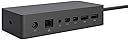
The Microsoft Surface Dock transforms your Surface device into a powerhouse workstation with dual HD video ports, gigabit Ethernet, and four high-speed USB 3.0 ports. Utilizing Surface Connect technology, it delivers lightning-fast data, audio, and video transfer over a single magnetic cable, keeping your workspace clean and efficient. Compatible with multiple Surface models and designed for easy plug-and-play setup, this dock is built to enhance multitasking and future-proof your productivity.


| ASIN | B01BOVBQ4C |
| Best Sellers Rank | 7,797 in Computers & Accessories ( See Top 100 in Computers & Accessories ) 65 in Docking Stations |
| Brand | Microsoft |
| Brand Name | Microsoft |
| Colour | Black |
| Compatible Devices | Microsoft Surface Book, Microsoft Surface Pro 3, Microsoft Surface Pro 4, Products: Microsoft |
| Compatible devices | Microsoft Surface Book, Microsoft Surface Pro 3, Microsoft Surface Pro 4, Products: Microsoft |
| Customer Reviews | 4.4 out of 5 stars 680 Reviews |
| Global Trade Identification Number | 00885370996425, 00889842013771 |
| Hardware Interface | Ethernet, USB 3.0 |
| Hardware interface | Ethernet, USB 3.0 |
| Item Dimensions L x W x H | 13L x 6W x 3H centimetres |
| Item Weight | 550 Grams |
| Manufacturer | Microsoft |
| Manufacturer Part Number | 1661 |
| Model Number | PD9-00011 |
| Number of Items | 1 |
| Number of Ports | 4 |
| Product Warranty | 2 year manufacturer |
| Product dimensions | 13L x 6W x 3H centimetres |
| Total USB Ports | 4 |
| Total USB ports | 4 |
| UPC | 885370996425 889842013771 |
| Unit Count | 1.0 count |
R**T
Very Happy
pondered on this purchase for a little while as its not cheap... and finally got fed up with my mess of wires and USB boxes. I also run two screen off my surface using the one video port on the Surface and a USB socket... I also have various backup drives, wireless mouse and keyboard dongle etc etc. to plug in and never mind audio speakers which tend to work better plugged in than with bluetooth. The clincher was two of my USB 3 splitters causing problems ... if you put cheaper product under load don't expect it to perform well in the long term. So I took the plunge and shelled out the cash for what I hoped would be a product of a similar quality and build as my Surface 4... anyway plugged it in and it was all just working with no hassle. I immediatly used ALL the sockets, video, audio, network and all the USB ports two of which plugged with 4 way splitters in each meaning that I have 10 USB 3 ports available to me and it has worked like a dream... I have not checked out everything yet but file transfer speeds have improved immeasurably. I am having no video problems all my screens are working well and it is so simple just plug the docking station into the power socket and it all runs from there while it also charges your Surface.... The build is good as well, it has that "it won't break if you drop it" feel... alltogether a good purchase ... I also understand that it will be forward compatible with the next generation of Surface computers so looks like I'm in clover, at least so far as this docking station is concerned.... I gotto say than none of this kit is cheap but I have been a surface user since the Pro 2 and this stuff just keeps on working unlike, two other laptops that I have bought in the last three years so as you can tell I am a happy bunny!
E**L
Expensive but does the job, no surprises.
I was a bit uncertain of what would be in the box as none of the reviews made this clear. The unit comes complete with its on power supply, so if using at work, you can leave your original power supply at home. The unit plugs into the surface pro where the original power supply fits and the this lead has extra functions over the standard lead as all of the functions of USB ports, network cabling and display ports come through the lead. The USB port on the surface pro is therefore free although with 4 ports on the dock you should not need it. The display port is also free, so potentially you could run three screens, but I have not tried this myself.
R**R
Excellent
I can't fault this product. Gone are the days of having to connect 3 different wires and plug in the charger under the desk. One simple connection (that feels far sturdier than the original charger) and I'm connected to 2 screens, my ethernet and my usb devices. The product is smaller and heavier than anticipated, but that is no problem and the wight helps keep the cables in place unlike some products that lift off the desk due to their lack of weight. Pros - Looks great, cables are long enough to conceal the unit and makes home working a lot easier Cons - None :-)
D**D
Browsing and beer don't mix
Really didn't want to buy this, the price is ridiculous. However browsing Amazon and alcohol are deadly! Having sobered up and seen the despatched text I decided to give it ago. There are 2 usb 3 ports at the rear. I have a 3tb WD portable hdd in one and an Anker 4 port hub plugged into the other. This holds the keyboard and mouse for my desktop set up, and I still have 2 spare ports on the Anker hub and 2 further usb 3 ports on the front of the dock. I have a 24 inch Philips monitor connected to the mini display port via a hdmi adapter. I I have a full sized Ethernet connected too. All the above working fine, no problems. Therefore I no longer have to mess about with the restriction of there only being 1 usb on my sp4. Is it worth it? No Does it make life easier and simpler? Yes There must be something to moan about? Yes there is. As the hub is mains powered, it's always on. This means the WD is always on and thus spinning, I just unplug the power lead, problem solved. It's a quality product and you even benefit from releasing the original sp4 power cable for use in a mobile sense.
L**R
Essential for frequent users; offers significant extra connectivity
An expensive but, for some, necessary expansion dock for the Surface Pro 3 and 4 but its appearance does nothing to enhance the ulta-slim Surface Pro; its blocky design could possibly benefit by being smaller and less rectangular and a change from its all black colour. It not only provides an extra 4 USB 3.0 ports but 2 HDMI ports that potentially support 4K graphics and a Gigabit Ethernet port. There is also an audio socket either for headphones or powered speakers. A USB-C port would have provided some benefit if the connector's bandwidth supports it and if included. It uses its own substantial power adapter which connects via a common form of co-axial socket and also powers the Surface Pro via the same magnetically-connected port as the standard power adapter, which it replaces. Its PSU, which is virtually identical in size to the hub, has some extra power to offer and appears not to get become quite as warm as the standard power unit when used for a few hours. It is no shrinking violet and is far heavier than it would appear. A normal 4-port USB hub has been sometimes used in the past - it was originally purchased to use with another laptop - but it obviously does not provide the same connectivity as the dock although several USB adapters could be purchased to provide the same functionality as this but they would consume most or all of the hub's ports. There is currently no single alternative to this Dock that provides similar connectivity. If you frequently use the Surface Pro and need some or most of the Dock's additional connectivity, then this is something to consider as it is so useful. It adds so much extra to the Surface's connectivity that it transforms the Surface Pro into a virtual desktop PC. There are reports that it cannot simultaneously support two 4K monitors but that is because some of the Surface models may not fully support MST (multi-screen technology); the top-of-range model may!
N**L
Excellent docking station for the surface pro 3 or 4.
This is actually quite brilliant though design wise almost too functional looking. It gives power, 4 USB 3.0 ports 2 extra display ports, a gigabit Ethernet port and media jack for the surface pro 4 (and 3). It's very solid, has a rubber underside to prevent slipping and a single magnetic lead to attach to the surface pro. It makes it a good alternative to a desktop. Only comment is like most of the surface accessories it's a bit pricey so look for online offers.
J**.
Excellent
Works perfectly and very convenient. I use my surface pro for work, and spend my time split between working from home and travelling - making this an ideal device - simply connect the magnetic docking connector and hey presto, you immediately have a full working station. Held off for a year on this as reviews didn't look promising, and it is quite pricey - not had a single problem with it. I've seen reviews of the ethernet connection causing problems (I use Wi-Fi though) - and other negative comments about the screen resolution - personally not noticed any issues (I use it for work though, not watching films or gaming)
M**N
Not very good for connecting a Surface Pro 5 to dual monitors
Unfortunately I have had to spend 4-5 hours onto Microsoft support trying to resolve issues. The Mac Doc seems to struggle with connecting to screens through the Mac Doc. I have two ViewSonic screens that require HDMI but the surface only has mini display ports. I am using two mini display port to HDMI cables. Both work fine when connected from monitors directly to the surface. However, when the Mac Dock is used the Surface blinks on and off and the screens remain blank. It does work intermittently but it seems more by luck than judgement and Microsoft Support have no answers. I have had a replacement MacDock but have same problems. I have stumbled on a fix that works for the moment. Boot up the computer (with Macdock and mini display cables not plugged in) then restart computer (quickly plugging the MacDock in with both mini display port cable plugged into it) then it seems to work. No idea why. So this is an expensive product that doesn't work out the box as it should and Microsoft don't know what is wrong with it, and it has led to many wasted working hours I can not score it any higher than one star. I just hope my work around might help out others with the same problem.
E**T
Ne fonctionne pas
Bonjour Le dock ne charge pas la tablette Cordialement
J**R
good product
good product
C**G
Großartige Erweiterung für ein älteres Surface pro 3
Diese Dockingstation erweitert mein altes Surface 3 enorm. Es hat schon immer gestört, das nur ein USB-Anschluss an dem Gerät war. Jetzt kann man Tastatur und Maus über USB anschließen und hat den Anschluß am Gerät noch frei. Auch das Laden über die Dockingstation klappt wunderbar. Alles in allem macht das Gerät incl. des mitgelieferten Netzteils einen sehr wertigen Eindruck und war als refubished ungefähr 80% unter dem Normalpreis. Auch erwähnenswer ist, das der Verkäufer superschnell versendet. Einen Tag nach der Bestellung hatte ich das Gerät in Händen, 3 Tage früher, als von Amazon gesagt.
R**N
Imprescindible para usar la surface como equipo de sobremesa
Si quieres usar la surface como ordenador de sobremesa es imprescindible para poder conectar los puertos de la impresora, monitor, usb, toma de audio... simplemente se conecta la toma de corriente que viene del dock y listo, no hace falta conectar nada más, por lo que mientras se utiliza se está cargando la surface.
D**O
Pérdida de conexión
He podido usarlo poco, pero, a veces, cuando vibra un poco la mesa donde está instalado, pierde la conexión. Por lo demás, cumple
Trustpilot
2 months ago
5 days ago