Buy anything from 5,000+ international stores. One checkout price. No surprise fees. Join 2M+ shoppers on Desertcart.
Desertcart purchases this item on your behalf and handles shipping, customs, and support to Samoa.
🕶️ Own your screen, own your space — privacy and protection in one sleek shield!
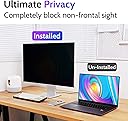
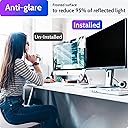
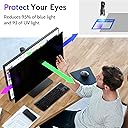
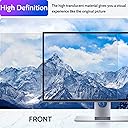
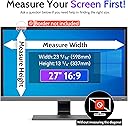
The Peslv 27-inch computer privacy screen is a precision-engineered filter designed for widescreen 16:9 monitors. It features advanced micro-blind technology to block side views beyond ±30°, dual-sided surfaces for anti-glare and privacy, and premium Japanese materials that filter 92% of blue light and 98% of UV rays. Compatible with major brands and easy to install with included accessories, it protects your screen and eyes while maintaining crystal-clear image quality.


| ASIN | B09S38B47Q |
| Best Sellers Rank | #12 in Monitor Anti-Glare & Privacy Filters |
| Brand | Peslv |
| Brand Name | Peslv |
| Clarity | 0.99 |
| Color | black screen |
| Compatible Devices | Computer Monitor 27 Inch 16:9 Aspect Ratio |
| Compatible Phone Models | 27 Inch Monitor Screen with 16:9 Aspect ratio |
| Customer Reviews | 3.8 out of 5 stars 1,054 Reviews |
| Finish Type | Matte & Glossy |
| Included Components | monitor privacy screen *1, screen cleaning kit *1, Large size nanofiber cleaning cloth *1, Slide Tab Mounting Kit *2, Double-sided adhesive installation kit *2, |
| Item Dimensions L x W | 23.9"L x 13.4"W |
| Item Hardness | 9H |
| Item Type Name | Privacy Screen for Computer Monitor 27 Inch 16:9 Aspect Ratio |
| Manufacturer | Peslv |
| Material | Polyethylene Terephthalate |
| Number of Items | 1 |
| Product Dimensions | 23.9"L x 13.4"W |
| Screen Size | 27 Inches |
| Screen Surface Description | Matte & Glossy |
| Special Features | Anti Glare |
| UPC | 774829215845 |
| Unit Count | 1.0 Count |
| Warranty Description | 3-year warranty |
A**L
Straightforward Installation - Does not stick to screen itself.
Okay I'm absolutely pleasantly surprised with this. I was expecting that with it being such a wide product the visibility protection would be minimal, but it's not bad. Angling your computer about 45 degrees will block visibility on half of the screen and make the other half a little harder to see. Start getting past that 45 degree mark and your screen is pretty well invisible to others (as in black as night). Do note that it does nothing for up and down. Like seriously if someone is right behind you but standing above you while you're sitting they'll see everything. Privacy only really works from side to side so it protects from people to the right and left of you seeing your computer screen as well or at all. If they're sitting or standing next to you then you should be good. If they're super close next to you expect them to be able to see about half of your screen, but if you're in a classroom setting for example and have no one sitting behind you, then no one but you should be able to see your screen with this on. Make sure that you actually check the specs on your computer so you get the right size. Mine fits perfectly according to my computer specs. I used the tabs that it comes with to put the protector on - the tabs are fully visible so if you care about that kind of thing be aware of that and plan for another way to secure it. You really do need to put the tabs on the right, left, and bottom of it at the absolute minimum for it to stay in place well. I put the tabs on all four sides to hold it. Unless I'm looking right at them I don't really notice them, but even being see through you can see them when you look right at them. Once you install it, it's pretty easy to use. It comes with the stuff you need to clean your screen before putting the protector on but be aware that unlike with a phone protector that just sticks straight to the screen this one DOES NOT stick to the screen itself, it just sits on top of it held up by tabs or an adhesive if you choose to go that route. Overall this is better than nothing for privacy but not fool-proof. Be aware of that going in. I expected it wouldn't be perfect so I was pleasantly surprised when I saw how well it covers. If you're expecting that only you will be able to see your screen just know there isn't a protector like this that can make that happen - they'll all struggle with 100% privacy if someone stands too close to you. As far as existing protectors this is the best one I've tried so far. Surprisingly satisfied.
C**R
Works when applied carefully and correctly per the included instruction.
Although applied correctly, it acts as a filter set in place by plastic ridges stuck to your laptop screen panel by an adhesive. Application takes merely 10 minutes and is easy with the instructions. As for the privacy it doesn't fully hide what a person would see when sitting beside you, imagine the screen only acts as a physical brightness reducer when looked on at an angle, as if you're viewing the screen at a bit above the lowest brightness setting. Though normal text is hard to make out, bold text and above are easy to read from the privacy angle unless you physically lower your PC brightness to half where it actually is near impossible to make out any data on your screen. The actual effect it has when using it is that you'll notice a reflection on the screen as equal of that of your phone screen when turned off. Dark screens will show you reflection and light sources will glare on the screen to where steaks of light can be seen at the corners of your screen depending on light intensity. It also darkens your PC screen by I'd say 10% of your PC's brightness The good thing is that it can be taken on and off, for laptops at least, the other options opt to be stuck by other adhesion sticker tools in the package. So using this screen shouldn't be a permanent solution tovbe left on your device since it actually lowers your screen's capabilities. If you were looking for that then this isn't a product for you if you're picky on the brightness effect.
C**A
Don't waste your money
This product *technically* does provide privacy to your screen. The problem is it doesn't stay on the screen, so it's useless. The adhesives that comes with it don't stick to the screen, or more accurately don't release from the backing so you can't get the screen on. I tried every option they sent and had the same issue. I finally gave up on don't it "right" and pulled the adhesive off and placed in on the screen protector and then put the screen protector on my computer. It worked for about 5 minutes and then fell off because the adhesives suck. Don't waste your time or money. If I could return it I would.
C**S
Filter not sticky by itself, it uses clear mounting tabs
The size is perfect for my hp Elitebook. And the blackout effect works. However I did not realize that the screen/filter itself is not sticky. So there are clear tabs that you stick on the sides to hold it in place. It does not stick by itself to your monitor. (I was expecting it to be like my cell phone screen protector which does stick by itself) This was helpful info from another reviewer (slightly edited) "This is the same style of privacy filter that has existed for decades, which was designed for monitors with bezels in mind. The reason being that if you go with the slide in plastic clip method of application, you can remove it entirely if you are collaborating with someone on something."
D**B
Good choice for a privacy screen
This product is working well for me. I was a little leary after having to return a screen protector from a different company and, so far, am very happy with this one. There are two installation options and I chose the stick-on option. After watching the video, installation was easy. I appreciate that extra double-sided sticky tabs were included, as well as two sets of the mounts for the slide-in option in case I need a redo at a later time. I wanted the screen so I can work on my laptop while traveling and privacy from an angle is excellent. When looking straight at the screen, the protector casts a slight shadow so I needed to boost up the brightness. There's no interference from the screen when closing my laptop.
S**N
Works for privacy, does nothing at all for glare.
The product comes with probably twice as many mounting stickers that you really need, which is good. It's a little tough to "slide" the filter under the tabs. I was installing 27" filters on monitors on my desk monitors, so it was pretty awkward to do. Would have been much easier to lie them flat and place the filters on, then put the sticky tabs along the edges (installation method 1). The tabs were quick sticky, though, so I would not expect them to fall off. There were questions I had that weren't answered in the very sparse instructions - did it matter which surface went against the screen and which faced out? Not that I could tell. The screens had a protective film on each side, with little print on the corners indicating to remove one before attaching and the other after - but I had to remove both before attaching, as it would not have been possible to remove the outer-facing one without disrupting the position under the tabs. So is that what it really meant? They don't sit completely flat against the monitor, (they bow out slightly). I've tried to adjust this based on mounting tab placement, but I think it's just simply gravity or electrostatic charge pushing them out. very slightly blurs detail, but I seemed to get used to it after a while. There is a notable reduction in brightness, but I had lots of headroom, so I just jumped up the brightness by 20% or so to compensate. I don't think it lived up to the claim of brightness, but it was not a problem for me. The privacy filter function seems to work quite well. But the whole reason I bought them was not for privacy, but because they purported to reduce glare. As you can see in the images, I don't see any glare reduction whatsoever. I installed one of them with the "remove first" side against the screen, and the other the opposite way since it wasn't clear for sure (as noted above), and both are equally useless for this. As such, I plan on returning.
User
Exactly what I was looking for
This is the same style of privacy filter that has existed for decades, which was designed for monitors with bezels in mind. The resin being that if you go with the slide in plastic clip method of application, you can flip it over and use it as a glare screen or even remove it entirely if you are collaborating with someone on something. The double back tape the provide as a workaround for laptops with no bezels, despite not having tried to use it, I would not recommend. These were not designed to be used in that way and it is a workaround. Additionally if the monitor is still too visible at the rated 30 degree angle, you should be adjusting you display brightness to the minimum that is visible and comfortable to read. This will make the display less visible on the edges of the privacy zone. Hope these tips help!
K**A
Privacy screen
I love this. No body can see hat ai am doing. An everyone ask me where I buy it
C**S
Best fit
I have Lenovo X13 as work computer and it did fit like a glove. Not easy to find 16:10 as dimensions but this one is great.
J**H
Too small
It was too small, sadly!
A**N
اهم منتج بالعمل
رائع يحجب الرؤية تماماً من الجانب، تبقى الرؤية متاحة من الأعلى ولكنه فعال جداً
D**N
Product as described
Nicely packed and protected
M**A
Tela de privacidade para laptop Lenovo E14
Produto maravilhoso. Chegou rápido e coube certinho no laptop. Produto de qualidade.
Trustpilot
2 days ago
1 month ago