๐ Turbocharge your Macโs Wi-Fi โ because buffering is so last decade!
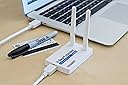
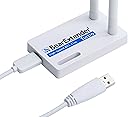
The Bearifi BearExtender Turbo is a high-speed 802.11ac USB Wi-Fi adapter designed specifically for Mac OS X users, delivering fast, reliable wireless connectivity with easy plug-and-play setup. Its compact design ensures portability, making it an essential upgrade for professionals seeking seamless internet performance.
| ASIN | B00H96G9N0 |
| Brand | BearExtender |
| Color | White |
| Compatible Devices | Apple MacBook Pro, Mac Mini, Mac Pro, MacBook Air, iMac |
| Compatible Operating System Family | MacOS |
| Customer Reviews | 4.0 out of 5 stars 70 Reviews |
| Data Link Protocol | 802.11ac, 802.11ac, 802.11n, 802.11g, 802,11b, IEEE 802.11ac, IEEE 802.11b, IEEE 802.11g, IEEE 802.11n, USB 3.0, USB 2.0, USB Data Link Protocol 802.11ac, 802.11ac, 802.11n, 802.11g, 802,11b, IEEE 802.11ac, IEEE 802.11b, IEEE 802.11g, IEEE 802.11n, USB 3.0, USB 2.0, USB See more |
| Data Transfer Rate | 867 Megabits Per Second |
| Hardware Interface | 802.11 ac/b/g/n, 802.11 b/g, 802.11 b/g/n, USB 2.0, USB 3.0 |
| Item Weight | 4.8 ounces |
| Manufacturer | BearExtender |
| Mfr Part Number | BETurbo |
| Model Number | BearExtender Turbo |
| UPC | 610395760962 |
| Warranty Description | 1 Year Warranty |
A**K
Worked with Windows 8.1
Tried this on 2 machines (desktop and laptop) that are running Win 8.1. It was simple plug and play drivers seem to have been included. Did NOT work on a windows 7 machine (might be drivers elsewhere but didn't look for them). It made a huge difference in the speed tests I ran when paired to my AC router (Asus). Very stable signal and showed other networks that were out of range with my built in WiFi cards. All in all very happy.
J**Z
Faster wifi with some software issues with Yosemite
i really like the Bear Extender Turbo. It is small, light, and works exactly as advertised. It gave my mac 802.11ac compatibility without having to buy a new computer. I like how compact the device is, and that it takes advantage of USB 3 ports for higher bandwidth (even though it is also USB 2.0 compatible). The USB cable provided is well made, thick and sturdy, but it is a bit too short. I'd love it if it had been maybe 6-12 inches longer, to improve the options of placement for the device. When running, it is fast, really fast, and the connection seems to me to be rock solid. You do need to install an application that must be up and running on your Mac in order for the Bear Extender to work, which is no big deal. It is best to make the bear Extender app run at startup, so that wifi will turn on as soon as the computer is done booting up, which is what I did. My only issue is the Yosemite drivers, which admittedly are in beta right now. They seem to be a bit buggy. The App froze on me at least 2-3 times, once so badly I could not reboot my Mac and had to do a hard shutdown. The other two times happened right after I switch my old AirPort Extreme for a new 802.11ac model. After that rocky start, everything seems to be going great, so, all in all, I'm very happy with my purchase. I think were it not for the short cable and buggy drivers, I'd give them a full 5 stars. And even so, the cable issue can be fixed by buying a third party one that is longer, and as far as the app goes, I'm sure they will improve the drivers as time goes by.
J**D
Extremely happy with this. Works PERFECTLY with Mavericks!
Update 7/21/2014: Just in case you're interested, this product works perfectly as well with a Bootcamp Windows 8.1 partition! I wrote the company and received immediate response with a driver to try using Windows 7. However, I'd decided to go straight up to Windows 8.1 and without even loading their driver, Windows 8.1 recognizes, loads drivers and uses this device (showing the full 867 speed). Again, very happy not only with the product, but the customer service is excellent as well. I'd tried another, lower cost AC USB adapter and I could not get it to lock onto the higher channel (kept reverting to the slower ones). I know there's some work-arounds (i.e. creating a separate network for 2.4 and 5) - but when I upgraded to Mavericks, it no longer worked - and the company offered no support. So, I invested in this and without any changes to the router (AP Extreme), it grabbed both channels and is reporting 867. Setup was a no-brainer (install software, restart, plug in). Drivers for Mavericks installed without a hitch. Very happy with this.
D**M
It works okay...sort of...sometimes
Pros: Better than your Macbook wifi antenna...sometimes. Will get you a signal nearby...50% of the time Wanna tap into your own wifi on the other end of the house? You're good. Wanna let your mother-in-law next door use your wifi? You're probably ok. Wanna tap into your hotel/rv park's internet with more reliability? Uuummmm...maybe. Sometimes yes/sometimes no. Don't count on it. Cons: Short cord...hope you plan to put your Mac in the window Proprietary cord? Or else hard to find. At least I've never seen a usb cord end like this. Want to use any wifi that isn't line of sight or is more than 100 feet away? Yeah....not gonna happen. It will NOT work. This thing sucks compared to my husband's Bear Extender, PC version, which was far cheaper, and that doesn't have a great range either. If it's not working well, try using your own Mac wifi antenna, because believe it or not, the BE can be finicky, and might actually work worse. Tips: If your Mac doesn't have a CD drive, you'll need to download the software from the company website. Not hard, but had to look for the link on the support page. ALWAYS turn your Mac wifi off first. If it's on, the BE won't work. Signal strength might say 94%, but that won't help you if the internet you're tapping into is super slow or has too many people on the network. You'll want a longer cord. Don't know if this is just proprietary or uncommon (at least, it looks uncommon to me). Maybe try a female to male usb cord to extend it? NOTE: Don't forget to turn off your Mac wifi when using this. If you don't, it's not going to work. So if it's not working, check that first. You'll have to go on the website to download the software if your Macbook doesn't have a CD drive (most don't). The installation was super easy, and once you have the download installed and your wifi off, it's basically just plug and play. I'm really disappointed in its range and performance, and very unhappy with the price I paid, given its performance, but I still find it useful sometimes when I'm away from home, which is why I gave it three stars.
K**.
and upload is so bad, I cannot stream anything back to the internet ...
Also this device works with Windows 8.1 - It's connection quality is awful. music streamings stops occasionally, and upload is so bad, I cannot stream anything back to the internet or other home devices I have 40 mbps internet, using speedtest.net with macbook's internal wifi adapter and PC with this device (bearextender turbo): macbook with built in wifi card: download - max (40 mbps) upload - max (40 mbps) pc with bearextender turbo: download - max(40 mbps) upload - 5-7 mbps both pc and macbook are placed side by side in 2 meters from Airport Extreme ac router except this I experience occasional packets drop when listening music from DI streams it just stops from time to time I dont understand how built in wifi card can be better than this expensive device. more than that - I tested speed using my iphone 5 - and both download and upload are max too. so my message to you: iphone wifi card is better than this device
A**S
Read the company's web site prior to purchasing!
I ordered this thinking it would act as an extender for my Xfinity gateway, since my brand new Mac Mini has such a poor range. It didn't help though and after reading more info on their web site, I see that it doesn't purport to do so. Check out their web site to make sure you're purchasing the correct device before purchasing.
B**K
quit the airport card in my 2008 Mac and got the best wifi speed I have had in years
Works just as advertised. Plug it in, quit the airport card in my 2008 Mac and got the best wifi speed I have had in years. While my airport card would tend to drop service, the Bear run steady and fast. After considering replacing the airport card inside the laptop, the plug in is an easy and cheap solution.
M**G
Example speed increase
(Using iMac (2007, OS X 10.9.1) wirelessly connecting to Airport Extreme AC (2013) about 25 feet away with no obstructions. Method of testing: Speedy Net app to test local network speeds installed on the iMac to ping via wireless to another Speed Net app installed on a local Mac Mini server connected via ethernet cable to the Airport Extreme.) โข Using the iMac's built in wireless-N, Speedy Net reports the Network Speed as 173 Mbps with a latency of 1.3 ms. โข Using the BearExtender 802.11ac (connected to the iMac's USB 2 port), Speedy Net reports the Network Speed as 246 Mbps with a latency of 2.6 ms. So not a huge increase, but noticeable even when just casually surfing, and noticeable again when dropping back down to wireless-n. I don't know if a computer with USB 3 ports would help increase the speed since the numbers are still below the theoretical maximum of USB 2, maybe someone with more expertise can comment. These numbers were obtained after running the tests several times to see what the typical result is. Yes, the latency was routinely slower by the numbers using the BearExtender, but it's on the order of 1 ms difference so not discernible. The (required) BearExtender app during these tests reported the Signal to be 99%-100% consistently. The app also reports the Speed as exactly 867 Mbps and never changes. Also note: the BearExtender app needs to be running in order for the device to connect to the network. Once connected, it seems to me that I can actually quit the app (although they recommend that you just minimize it in your dock) and the connection remains. However, should the connect become lost for whatever reason, the device won't reconnect automatically until you restart the BearExtender app. The only problem I have routinely encountered is when I have to use the Citrix Receiver app to log into work via internet. Somewhere in the process an error pops up because the BearExtender app is interfering. Simply quitting the BearExtender app is the solution, but it's just annoying because I would rather keep the BearExtender app automatically running and minimized. I haven't spent much time yet trying to figure out or fix this issue though.
Trustpilot
3 weeks ago
1 month ago